
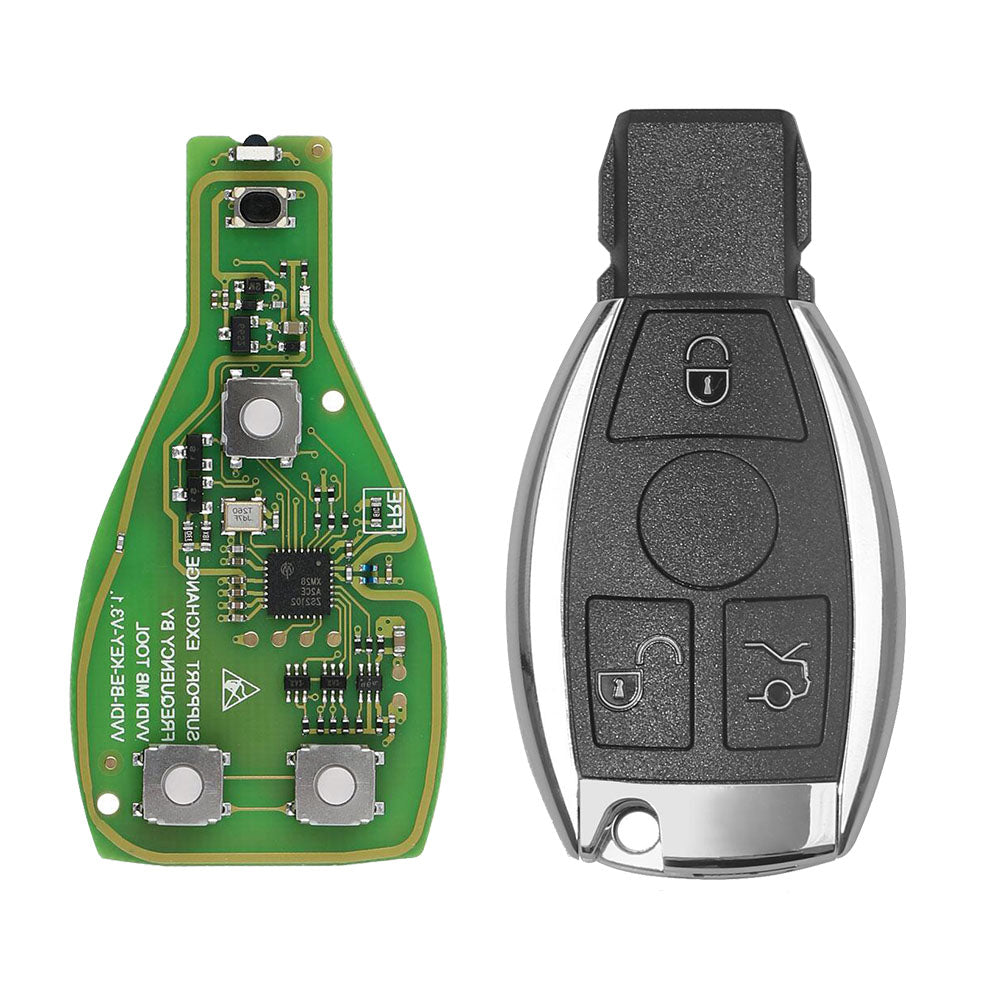
Xhorse VVDI BE Key Pro Geliştirilmiş Versiyon Tam Anahtar Paketi, Mercedes Benz için 3 Butonlu Akıllı Anahtar Kabı ile
$24.99
30-day return · buyer pays return shipping · read details
Fast Shipping & Tax Free
US
Ship from US
EU
Ship from EU
UK
Ship from UK
Mercedes Benz için Xhorse VVDI BE Key Pro Geliştirilmiş Versiyon ve 3 Butonlu Akıllı Anahtar Kabı
Bu paket orijinal Xhorse VVDI BE Key Pro Geliştirilmiş Versiyon PCB ve 3 butonlu Akıllı Anahtar Kabı içerir. Her iki parça da orijinal Xhorse ürünüdür.
1 VVDI BE Key Pro Geliştirilmiş Versiyon, 200 VVDI MB BGA Tool Puanına veya 1 VVDI MB BGA Token’a eşittir. Token’ı uygulama üzerinden alınız.
Özellikler
- Daha fazla uyumluluk
- Yeni tasarım
- Yüksek kararlılık
- Yüksek güvenilirlik
- Dijital imza
Geliştirmeler
- W164/W639 EIS verilerinin anahtarla senkronize olmaması sorununu düzeltir.
- Anahtar EIS/EZS’den çıkarılmadan kontağın tekrar tekrar açılması sonrası BE anahtarın çalışmaması sorununu giderir (örneğin teşhis veya arıza temizleme sırasında).
- Güçlü bagaj kapağı olan araçlarda bagaj uzaktan açma sorunlarını çözer.
- BE anahtarın RF sinyalini sadece bir kez göndermesi sorununu giderir; güncellemeden sonra basılıp bırakıldığında RF sinyalini iki kez gönderebilir.
- Rolling kod algoritmasını optimize eder ve BE anahtardaki hataları düzeltir.
- HASH değerinin önceden ilerlemesini sağlayan pre-roll algoritması ekler.
- Kızılötesi iletişim kararlılığını artırmak için otomotiv sınıfı kuvars kristal kullanır.
- Butona basıldığında kızılötesi sinyal gücünü artırır.
- Frekans 315MHz ile 433.92MHz arasında VVDI MB Tool veya PCB SMD direnç ile sıfırlanabilir.
Not: VVDI MB Tool ayarları SMD dirençten önceliklidir. Frekans VVDI MB Tool ile önce sıfırlanırsa, SMD direnç çalışmaz. Direnci kullanmak için önce VVDI MB Tool ile frekansı silmelisiniz.
PCB SMD Direnç ile Frekans Sıfırlama:
Frekansı 315MHz olarak ayarlamak için belirtilen konuma 1K SMD direnç lehimleyin. Direnci çıkarırsanız frekans 433.92MHz olur.
Montaj Kılavuzu:
VVDI BE Key Pro Geliştirilmiş Versiyon PCB’yi 3 butonlu Akıllı Anahtar Kabı ile birleştirmek için:
1. VVDI BE Key Pro geliştirilmiş versiyon PCB’sini kasaya yerleştirin.

2. Alt kasayı kapatın.

3. Pili takın ve kasayı kapatın.

4. Her iki taraftaki metal şeritleri doğru konuma itin.

Arka metal parça önce monte edilirse, her iki taraftaki metal şeritler doğru konuma itilemez.
5. Burada arka metal düğme.

6. Küçük anahtarı ve start düğmesini takın.

Kasa sökmek isterseniz, lütfen son adımdan ilk adıma doğru yapınız.

Not: Arka metal parça önce monte edilirse, her iki taraftaki metal şeritler doğru konuma yerleştirilemez.
Paket İçeriği:
1 adet x Xhorse VVDI BE Key Pro Geliştirilmiş Versiyon
1 adet x Mercedes Benz için 3 Butonlu Akıllı Anahtar Kabı
Reviews coming soon.